
At a glance
Compare how people fill a cup, not just the panel.
Review the dispensing controls, available feedback and model-specific safety features. Digital or mechanical controls do not by themselves establish filtration performance, water capacity or suitability for your team.
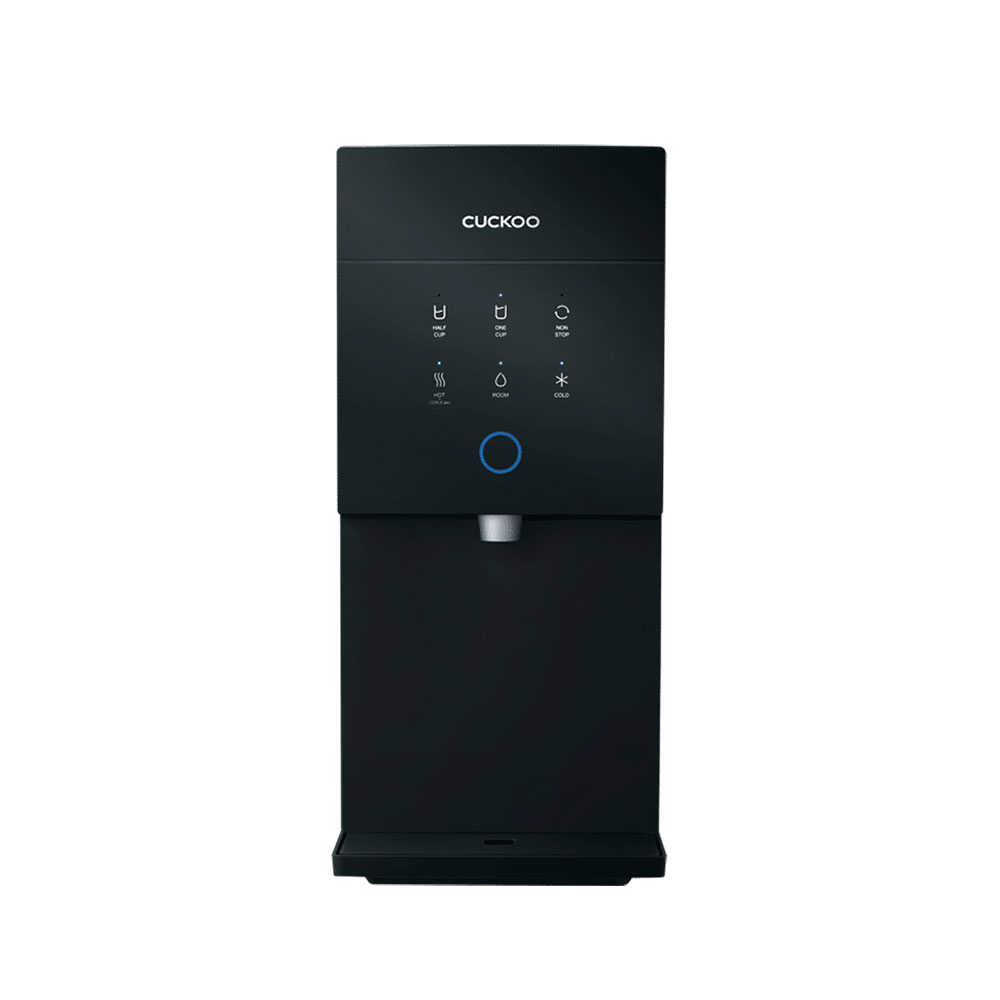
Office buyers often compare water output, tankless design, or monthly commitment first. Control style can feel like a smaller detail, but it shapes how natural the purifier feels once staff start using it every day. Before narrowing the shortlist, it helps to compare the wider water purifier range and decide whether the office needs a cleaner digital experience or a more direct mechanical setup.
What digital controls usually do better
Digital controls often suit offices that want a more modern pantry look, clearer display feedback, and a polished user experience. This can matter in reception-adjacent pantry areas, shared client spaces, clinic staff rooms, and offices where the purifier is visible instead of hidden in a back pantry.
- Cleaner interface: useful when the office wants the unit to look more current
- More guided operation: helpful when users prefer clear display cues
- Better visual fit: suitable for visible pantry corners and customer-facing environments
- Feature-led preference: useful when the office values more control flexibility
For digital-style comparisons, buyers often start with models such as Xcel 2 or Grande, depending on pantry style, water output needs, and budget preference.
What mechanical controls usually do better
Mechanical controls are often easier to understand at a glance. They can make sense when the pantry is mostly used by the same staff group, when the team prefers simple operation, or when the business wants fewer things for users to think about during a busy day.
- Simple daily use: clearer for staff who just want fast access
- Less learning curve: useful for shared staff rooms and practical pantry corners
- Straightforward routine: suitable when the office does not need a premium control feel
- Practical comparison: often easier for smaller offices to shortlist
For straightforward mechanical-style office use, models such as King Top 2 and Warrior are often worth comparing, especially when the pantry needs practical hot, cold, and room-temperature access without feeling overcomplicated.
The better control style is the one staff will use comfortably without needing reminders.
A polished digital panel can be the right fit for visible offices, but a simpler mechanical setup can feel better in a busy internal pantry where speed and familiarity matter more.
When digital makes more sense for an office
Digital usually becomes more attractive when the water purifier is part of a more polished office experience. This may include front-facing business areas, management offices, clinics, service counters, or pantry spaces where appearance and user confidence matter.
It can also suit teams that like more visible controls and clearer operating feedback. The office does not need to choose digital just because it sounds newer, but it becomes useful when the room and user expectations support it.
When mechanical is the better practical choice
Mechanical can be the better choice when the pantry serves a steady internal team and the priority is daily convenience. In many offices, staff do not need a more advanced interface. They just need a purifier that is easy to use during lunch breaks, short pantry visits, and repeated water refills.
This is especially relevant for smaller admin teams, compact pantry corners, back-office staff areas, and practical office setups where the purifier is not a visual centrepiece.
Questions to ask before choosing control style
- Will the water purifier be seen by visitors or mainly used by staff?
- Do users prefer clear display cues or simple direct controls?
- Is the pantry a polished front-space corner or a practical internal staff area?
- Does the office need full hot, cold, and room-temperature use?
- Will many different people use the unit, or mostly the same team every day?
Simple model direction
- Polished digital pantry feel: compare Xcel 2
- Digital with stronger hot-water focus: compare Grande
- Simple general office use: compare King Top 2
- Practical mechanical-style shared use: compare Warrior
- Minimal room-water-only setup: compare Kiut if hot and cold water are not needed
Frequently asked questions
Is a digital water purifier better for office use?
Not always. Digital is better when the office values a cleaner interface, visible display cues, or a more polished pantry feel. For simple staff-only use, mechanical controls may be just as suitable.
Are mechanical controls easier for shared office pantries?
They can be. Mechanical controls are often easier for repeat daily use because staff can understand the operation quickly without focusing on display settings.
Which control type suits a visible reception pantry?
Digital often fits better in visible pantry corners because the interface feels more current and polished. The final choice still depends on water output needs and user count.
Should control style decide the model first?
No. Start with pantry size, expected users, and water output needs first. Control style should help refine the shortlist after the basic office usage pattern is clear.
Final thought
Digital and mechanical water purifiers can both be suitable for office use. The better choice comes from matching the control style to the room, the users, and the daily rhythm of the pantry. If the purifier is visible and the office wants a polished feel, digital can be worth comparing first. If the pantry is mainly internal and staff value straightforward operation, mechanical may be the more natural fit.